Showing posts with label Java67. Show all posts

Saturday, July 11, 2015

Interview - Linux Miscs


http://www.brianstorti.com/an_introduction_to_unix_processes/
Every process is created using the fork system call. We won’t cover system calls in this post, but you can imagine them as a way for a program to send a message to the kernel (in this case, asking for the creation of a new process).

What fork does is create a copy of the calling process. The newly created process is called the child, and the caller is the parent. This child process inherits everything that the parent has in memory, it’s an almost exact copy (pid and ppid are different, for instance).
One thing to be aware of is that if a process is using 200MB of memory, when it forks a child, the newly created process will use more 200MB. This can easily become an accidental “fork bomb”, that will consume all the available resources of the machine.

The second step is the exec. What exec does is replace the current process with a new one. The caller process is gone forever, and the new process takes its place. If you try to run this command in a terminal session:
exec vim


vim will be opened normally, as it was a direct call to it, but as soon as you close it, you will see that the terminal is gone as well. So here’s what happened:
You had a shell process running (bash, zsh or similar). In the moment that you called exec, passing vim and a parameter, it replaced the bash process with a vim process, so when you close vim, there is no shell there anymore.

If you are running a bash process, when you call, say, ls, to list your files, what actually is done is exactly this. The bash process calls fork to create an exact copy of itself, then call exec, to replace this copy with the ls process. When the lsprocess exits, you are back to the parent process, that is bash


A process is an instance of a running program;
Processes have some properties related to it (pid, ppid, tty, etc.);
Processes are created in a two step process: exec and fork;
Processes always exit with an exit code;
A process is a zombie if it is already dead but its parent still didn’t read its exit code with wait;
A process is an orphan if it is still alive but its parent isn’t. The initprocess becomes the new parent;
A daemon is a process that runs in the background, and is not attached to a controlling terminal;
Signals are messages sent from one process to another
https://unix.stackexchange.com/questions/136637/why-do-we-need-to-fork-to-create-new-processes

The short answer is, fork is in Unix because it was easy to fit into the existing system at the time, and because a predecessor system at Berkeley had used the concept of forks.
From The Evolution of the Unix Time-sharing System (relevant text has been highlighted):
Process control in its modern form was designed and implemented within a couple of days. It is astonishing how easily it fitted into the existing system; at the same time it is easy to see how some of the slightly unusual features of the design are present precisely because they represented small, easily-coded changes to what existed. A good example is the separation of the fork and exec functions. The most common model for the creation of new processes involves specifying a program for the process to execute; in Unix, a forked process continues to run the same program as its parent until it performs an explicit exec. The separation of the functions is certainly not unique to Unix, and in fact it was present in the Berkeley time-sharing system, which was well-known to Thompson. Still, it seems reasonable to suppose that it exists in Unix mainly because of the ease with which fork could be implemented without changing much else. The system already handled multiple (i.e. two) processes; there was a process table, and the processes were swapped between main memory and the disk. The initial implementation of fork required only
1) Expansion of the process table
2) Addition of a fork call that copied the current process to the disk swap area, using the already existing swap IO primitives, and made some adjustments to the process table.
In fact, the PDP-7's fork call required precisely 27 lines of assembly code. Of course, other changes in the operating system and user programs were required, and some of them were rather interesting and unexpected. But a combined fork-exec would have been considerably more complicated, if only because exec as such did not exist; its function was already performed, using explicit IO, by the shell.
Since that paper, Unix has evolved. fork followed by exec is no longer the only way to run a program.
  • vfork was created to be a more efficient fork for the case where the new process intends to do an exec right after the fork. After doing a vfork, the parent and child processes share the same data space, and the parent process is suspended until the child process either execs a program or exits.
  • posix_spawn creates a new process and executes a file in a single system call. It takes a bunch of parameters that let you selectively share the caller's open files and copy its signal disposition and other attributes to the new process.
http://www.geeksforgeeks.org/linux-virtualization-using-chroot-jail/
A chroot on Unix operating systems is an operation that changes the apparent root directory for the current running process and its children. The programs that run in this modified environment cannot access the files outside the designated directory tree. This essentially limits their access to a directory tree and thus they get the name “chroot jail”.
The idea is that you create a directory tree where you copy or link in all the system files needed for a process to run. You then use the chroot system call to change the root directory to be at the base of this new tree and start the process running in that chrooted environment. Since it can’t actually reference paths outside the modified root, it can’t maliciously read or write to those locations.
Why is it required and how is it different from the virtual machines?
This is a Operating-system-level virtualization and is often used instead of virtual machines to create multiple isolated instances of the host OS. This is a kernel level virtualization and has practically no overhead as compared to Virtual Machines, which are a application layer virtualization, as a result it provides a very good method for creating multiple isolated instances on the same hardware. A virtual machine (VM) is a software implementation of a machine and they often exploit what is know as the Hardware Virtualization to render a virtual images of a working operating system.

What is difference between hard link and soft link in UNIX?
http://java67.blogspot.com/2015/07/what-is-difference-between-hard-link.html
hard link is direct pointer to the inode of the original file. If you compare the original file with the hard link there won't be any differences between them. On other hand, a soft link is a file that have the information to point to another file or inode. That inode points to the data in the disk. 

Hard links are much more restrictive than soft links and that's why they are used rarely.

Difference between Soft link and Hard link in UNIX
1) The target of the the hard link must exist, which is not mandatory in case of soft link. A soft link is said broken if target link doesn't exists.

2) Unlike soft link which are mostly created to reference directories e.g. current link pointing to latest release, Hard links are generally not allowed on directories.

3) One more critical difference between soft link and Hard link is that hard links are not allowed to cross partitions or volumes. Therefore, they cannot exist across file systems.

4) A hard link looks, and behaves, like a regular file, so they can be hard to find. On the other hand soft links are quite different than regular files.


5) A hard link is, for all intents and purposes, the same entity as the original file. They have the same file permissions, time stamps, and so on. All attributes are identical.
Difference Between User Level Threads and Kernel Level Threads
A process is an executing instance of a computer program. We say instance because we may have multiple copies of the same program running simultaneously. How does a process layout look like when loaded into memory for execution ? It is divided into four sections as follows:
  • Text section contains compiled code of the program logic.
  • Data section stores global and static variables.
  • Heap section contains dynamically allocated memory (ex. when you use malloc or new in C or C++).
  • Stack section stores local variables and function return values.
Stack and heap sections grow in opposite directions as shown in the figure below.
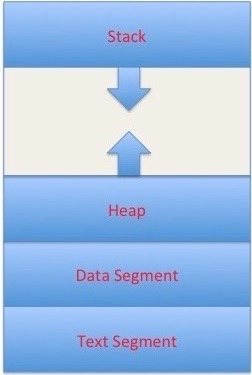
memory_layout
Thread Management
A thread is a sequence of instructions.
CPU can handle one instruction at a time.
To switch between instructions on parallel threads, execution state need to be saved.
Execution state in its simplest form is a program counter and CPU registers.
Program counter tells us what instruction to execute next.
CPU registers hold execution arguments for example addition operands.
This alternation between threads requires management.
Management includes saving state, restoring state, deciding what thread to pick next and why?
Thread management decides thread type. User level threads are managed by a user level library and kernel level threads are managed by the operating system kernel code.

User Level Threads
user level threads are managed by a user level library however, they still require a kernel system call to operate. It does not mean that the kernel knows anything about thread management. Not at all, It only takes care of the execution part. The lack of cooperation between user level threads and the kernel is a known disadvantage. In this case, the kernel may not favor a process that has many threads. User level threads are typically fast. Creating threads, switching between threads and synchronizing threads only needs a procedure call. They are a good choice for non blocking tasks otherwise the entire process will block if any of the threads blocks.

Kernel Level Threads
Kernel level threads are managed by the OS, therefore, thread operations (ex. Scheduling) are implemented in the kernel code. This means kernel level threads may favor thread heavy processes. Moreover, they can also utilize multiprocessor systems by splitting threads on different processors or cores. They are a good choice for processes that block frequently. If one thread blocks it does not cause the entire process to block. Kernel level threads have disadvantages as well. They are slower than user level threads due to the management overhead. Kernel level context switch involves more steps than just saving some registers. Finally, they are not portable because the implementation is operating system dependent.

UNIX command to find symbolic link or soft link in Linux
http://java67.blogspot.com/2012/10/unix-command-to-find-symbolic-link-or.html
First way is by using  ls command in UNIX which display files, directories and links in any directory.

other way is by using UNIX find command which has ability to search any kind of files e.g. file, directory or link.

ls -lrt
lrwxrwxrwx ==> l means link
ls -lrt | grep ^l

find . -type l

find . -maxdepth 1 -type l

Linux下具有基本功能的shell的具体代码实现
1. 支持ls,touch,wc 等外部命令
2. 支持输入输出重定向符
3. 支持管道命令
4 .支持后台作业
5. 支持cd,jobs,kill,exit等内部命令(自己还写了一个about 命令 ^ _ ^)
6. 支持对ctrl+c 和ctrl +z 信号的处理


Interview - Java Concurrency


http://www.obsidianscheduler.com/blog/java-concurrency-part-5-queues/
Blocking Queue
LinkedBlockingQueue

we want to execute a Command but need to know when it is done, waiting at most 2 minutes.

private BlockingQueue workQueue = new LinkedBlockingQueue();
private Map> commandQueueMap = new ConcurrentHashMap>(); 
 
public SynchronousQueue addCommand(Command command) {
    SynchronousQueue queue = new SynchronousQueue();
    commandQueueMap.put(command, queue);
    workQueue.offer(command);
    return queue;
}

public Object call() throws Exception {
    try {
        Command command = workQueue.take();
        Result result = command.execute();
        SynchronousQueue queue = commandQueueMap.get(command);
        queue.offer(result);
        return null;
    } catch (InterruptedException e) {
        throw new WorkException(e);
    }
}
Now the consumer can safely poll with timeout on its request to have its Command executed.
Command command;
SynchronousQueue queue = commandRunner.addCommand(command);
Result result = queue.poll(2, TimeUnit.MINUTES);
if (result == null) {
 throw new CommandTooLongException(command);
} else {
 return result;
}
- How about future.get(timout)?

http://www.obsidianscheduler.com/blog/tag/concurrency-2/

CountDownLatch – a more general wait/notify mechanism

CountDownLatch can actually be used similar to a wait/notify with only one notify – that is, as long as you don’t want wait() to stall if notify() is called before you have acquired the lock and invoked wait(). It is actually more forgiving because of this, and in some cases, it’s just what you want

it is simpler than wait/notify, and requires less code. It also allows us to invoke the condition that ultimately releases the block before we call wait().

http://java67.blogspot.com/2015/06/java-countdownlatch-example.html
CountDowaLatch is a high level synchronization utility which is used to prevent a particular thread to start processing until all threads are ready. This is achieved by a count down. The thread, which needs to wait starts with a counter, each thread them make the count down by 1 when they become ready, once the last thread call countDown() method, then latch is broken and the thread waiting with counter starts running. CountDownLatch is a useful synchronizer and used heavily in multi-threaded testing. You can use this class to simulate truly concurrent behavior i.e. trying to access something at same time once every thread is ready. 

Worth noting is that CountDownLatch starts with a fixed number of counts which cannot be changed later, though this restriction is re-mediated in Java 7 by introducing a similar but flexible concurrency utility called Phaser.

CyclicBarrier can also be used in this situation, where one thread needs to wait for other threads before they start processing. Only difference between CyclicBarrier and CountDownLatch is that you can reuse the barrier even after its broker but you cannot reuse the count down latch, once count reaches to zero. 


await() is a blocking call and it blocks until count reaches zero.
One of the popular use of CountDownLatch is in testing concurrent code, by using this latch you can guarantee that multiple threads are firing request simultaneously or executing code at almost same time.

How to use CyclicBarrier in Java 
http://java67.blogspot.com/2015/06/how-to-use-cyclicbarrier-in-java.html
CyclicBarrier is used when a number of threads (also known as parties) wants to wait for each other at a common point, also known as barrier before starting processing again.
You can use this to perform final task once individual task are completed.

Its similar to CountDownLatch but instead of calling countDown() each thread calls await() and when last thread calls await() which signals that it has reached barrier, all thread started processing again, also known as barrier is broken.

Some of the common usage of CyclicBarrier is in writing unit test for concurrent program, to simulate concurrency in test class or calculating final result after individual task has completed.

http://java67.blogspot.com/2012/08/difference-between-countdownlatch-and-cyclicbarrier-java.html
you can not reuse same CountDownLatch instance once count reaches to zero and latch is open, on the other hand CyclicBarrier can be reused by resetting Barrier, Once barrier is broken.

A useful property of a CountDownLatch is that it doesn't require that threads calling countDown wait for the count to reach zero before proceeding, it simply prevents any thread from proceeding past an await until all threads could pass.

CyclicBarrier supports an optional Runnable command that is run once per barrier point, after the last thread in the party arrives, but before any threads are released. This barrier action is useful for updating shared-state before any of the parties continue.

The CyclicBarrier uses a fast-fail all-or-none breakage model for failed synchronization attempts: If a thread leaves a barrier point prematurely because of interruption, failure, or timeout, all other threads, even those that have not yet resumed from a previous await(), will also leave abnormally via BrokenBarrierException (or InterruptedException if they too were interrupted at about the same time).

CountDownLatch
    public CountDownLatch(int count) {
        this.sync = new Sync(count);

    }
    public void countDown() {
        sync.releaseShared(1);

    }
    public boolean await(long timeout, TimeUnit unit)
        throws InterruptedException {
        return sync.tryAcquireSharedNanos(1, unit.toNanos(timeout));

    }
    public void await() throws InterruptedException {
        sync.acquireSharedInterruptibly(1);

    }
CyclicBarrier - use lock and condition
    /** The lock for guarding barrier entry */
    private final ReentrantLock lock = new ReentrantLock();
    /** Condition to wait on until tripped */

    private final Condition trip = lock.newCondition();
    public CyclicBarrier(int parties, Runnable barrierAction) {
        this.parties = parties;
        this.count = parties;
        this.barrierCommand = barrierAction;

    }
    private int dowait(boolean timed, long nanos){
        final ReentrantLock lock = this.lock;
        lock.lock();
        try {
            final Generation g = generation;
           int index = --count;
           if (index == 0) {  // tripped
               boolean ranAction = false;
               try {
                   final Runnable command = barrierCommand;
                   if (command != null)
                       command.run();
                   ranAction = true;
                   nextGeneration();
                   return 0;
               } finally {
                   if (!ranAction)
                       breakBarrier();
               }
           }

            // loop until tripped, broken, interrupted, or timed out
            for (;;) {
                try {
                    if (!timed)
                        trip.await();
                    else if (nanos > 0L)
                        nanos = trip.awaitNanos(nanos);
                } catch (InterruptedException ie) {}
                if (timed && nanos <= 0L) {
                    breakBarrier();
                    throw new TimeoutException();
                }
            }
        } finally {
            lock.unlock();
        }

    }
Phaser: It also has number of unarrived party just like barrier and latch but that number is flexible. 
Phaser (as the JavaDocs say) is very much like a CountDownLatch or a CyclicBarrier but is better suited where:
  1. Parallel operations need to proceed in lockstep
  2. After every step, all parallel operations wait until all others have completed
  3. When they do, all proceed to the next step and so on...


Interview - Java Core Miscs


10 points about Static in Java
http://java67.blogspot.com/2012/11/what-is-static-class-variable-method.html
1) You can not access non static member inside static context e.g. static method or static block.
2) Unlike local variables,  Static variables and methods are not thread-safe in Java
4) Another important point about static method is that, you can not override static method in Java. If you declare same method in sub class i.e. static method with same name and method signature
it will only hide super class method, instead of overriding it. This is also known as method hiding in Java. What this means is, if you call a static method, which is declared in both super class and sub class, method is always resolved at compile time by using Type of reference variable. Unlike case of method overriding they will not resolved during runtime.

5) You can also make a class static in Java, except top level classes.
6) static keyword can also be used to declare static block which is executed during class loading. 
This is known as static initializer block in Java. If you don't declare a static initializer block by yourself then Java combines all static fields into one block and execute them during class loading. Though static block can not throw checked exception, they can still throw unchecked exception, which if occurred may result in ExceptionInitializerError.  Actually any runtime exception thrown during instantiation and initialization of static fields, will be wrapped by Java runtime into this error. This is also one of the most common reason of  NoClassDefFoundError in Java, because the class in question was not present in memory when its client needed them.

7) One more thing to know about static methods is that they are bonded during compile time using static binding.

8) One of the important property of static field is initialization. Static fields or variables are initialized when class is loaded into memory. They are initialized from top to bottom in the order they are declared in Java source file.

9) During Serialization, like transient variables, static variables are also not serialized. It means, if you store any data in static filed then after de-serialization, new object will contain its default value e.g.
10) Another feature related to static keyword is called static import.

Why String Class is made Immutable or Final
http://java67.blogspot.com/2014/01/why-string-class-has-made-immutable-or-final-java.html
1) String Pool
store String literals in String pool. Goal was to reduce temporary String object by sharing them and in order to share, they must have to be from Immutable class.
4) Multithreading Benefits

5) Optimization and Performance
String cache its hashcode. It even calculate hashcode lazily and once created, just cache it. In simple world, when you first call hashCode() method of any String object, it calculate hash code and all subsequent call to hashCode() returns already calculated, cached value.

2) Security
If String was not immutable, a user might have granted to access a particular file in system, but after authentication he can change the PATH to something else, this could cause serious security issues. Similarly, while connecting to database or any other machine in network, mutating String value can pose security threats. Mutable strings could also cause security problem in Reflection as well, as the parameters are strings.

3) Use of String in Class Loading Mechanism
As String been not Immutable, an attacker can take advantage of this fact and a request to load standard Java classes e.g. java.io.Reader can be changed to malicious class.

5) Hashmap keys
It's one of the most popular object to be used as key in hash based collections e.g. HashMap and Hashtable. Though immutability is not an absolute requirement for HashMap keys, its much more safe to use Immutable object as key than mutable ones, because if state of mutable object is changed during its stay inside HashMap, it would be impossible to retrieve it back, given it's equals() and hashCode() method depends upon the changed attribute.

Disadvantages
Since String is immutable, it generates lots of temporary use and throw object, which creates pressure for Garbage collector.
new String() will not pick object from String pool.

String pool is located in PermGen Space of Java Heap, which is very limited as compared to Java Heap. Having too many String literals will quickly fill this space, resulting in java.lang.OutOfMemoryError: PermGen Space.
from Java 7 onwards, they have moved String pool to normal heap space, which is much much larger than PermGen space.

Interview - Java Exception


NoClassDefFoundError vs ClassNotFoundExcepiton
http://java67.blogspot.com/2012/12/noclassdeffounderror-vs-classnotfoundexception-java.html
NoClassDefFoundError indicates that class was present during time of compilation but not available when you run Java program, some time error on static initializer block can also result in NoClassDefFoundError.

On the other hand ClassNotFoundException is nothing to do with compile time, ClassNotFoundException comes when you try to load a class in runtime using Reflection, e.g. loading SQL drivers and corresponding Class loader is not able to find this class.

1) NoClassDefFoundError is an Error which is unchecked in nature, i.e. doesn't require try-catch or finally block. On the other hand ClassNotFoundException is a checked Exception and requires mandatory handing using either try with catch block or try with finally block, failure to do so will result in compile time error.

2) If you are experiencing NoClassDefFoundError in J2EE environment, there could be host of reason, one being multiple class loader and visibility of class among them.

3) Often java.lang.ClassNotFoundException is thrown as result of following method call, Class.forName(), ClassLoader.findSystemClass() and ClassLoader.loadClass().

4) Another difference between NoClassDefFoundError and ClassNotFoundException is that NoClassDefFoundError is a LinkageError and can come during linking, while java.lang.ClassNotFoundException is an Exception and occurs during runtime.


Comparison of Exception Handling in C++ and Java
http://massivetechinterview.blogspot.com/2014/07/comparison-of-exception-handling-in-c.html

3 ways to solve java.lang.NoClassDefFoundError in Java J2EE
http://javarevisited.blogspot.com/2011/06/noclassdeffounderror-exception-in.html
NoClassDefFoundError in Java comes when Java Virtual Machine is not able to find a particular class at runtime which was available during compile time. For example if we have a method call from a class or accessing any static member of a Class and that class is not available during run-time then JVM will throw NoClassDefFoundError. It’s important to understand that this is different than ClassNotFoundException which comes while trying to load a class at run-time only and name was provided during runtime not on compile time.

How to resolve java.lang.NoClassDefFoundError in Java
1) Class is not available in Java Classpath.
2) You might be running your program using jar command and class was not defined in manifest file's ClassPath attribute.
3) Any start-up script is overriding Classpath environment variable.

4) Because NoClassDefFoundError is a sub class of java.lang.LinkageError it can also come if one of it dependency like native library may not available.
4) Check for java.lang.ExceptionInInitializerError in your log file. NoClassDefFoundError due to failure of static initialization is quite common.
5) If you are working in J2EE environment than visibility of Class among multiple Classloader can also cause java.lang.NoClassDefFoundError

Use System.getproperty("java.classpath")and it will print the classpath from there you can at least get an idea of your actual runtime classpath.

NoClassDefFoundError in Java due to Exception in Static Initializer block
when your class perform some static initialization in static block like many Singleton classes initialized itself on static block  to take advantage of thread-safety provided by JVM during class initialization process, and if static block throw an Exception, the class which is referring to this class will get NoclassDefFoundError in Java. If you look at your log file you should watch for any java.lang.ExceptionInInitializerError because that could trigger java.lang.NoClassDefFoundError: Could not initialize class on other places.

7) Permission issue on JAR file can also cause NoClassDefFoundError in Java. I
10) java.lang.NoClassDefFoundError can be caused due to multiple classloaders in J2EE environments.

12) Java program can also throw java.lang.NoClassDefFoundError during linking which occurs during class loading in Java. - class is not here at runtime.
http://www.corejavainterviewquestions.com/java-exception-interview-questions/
Exceptions are a way to programmatically convey system and programming errors. All exceptions inherit from Throwable.  When something goes wrong you can use the throw keyword to fire an exception.

There are 2 types of exception in Java, what are they and what’s the difference?
The two types of exception are checked and unchecked

A checked exception is one that forces you to catch it. It forms part of the API or contract. Anyone using code that throws a checked Exception can see that as it is declared on the method and they are forced to handle it using a try/catch block.  Unchecked on the other hand does not need to be caught and does not notify anyone using the code that it could be thrown.

All exceptions are checked exceptions except those that inherit from java.lang.RuntimeException.

When catching exceptions it is important to do so in order from most specific to least specific.  If your catch block catches Exception first and then IOException second, the first catch block will always catch any Exception coming through and the IOException will be rendered useless (and in fact it will cause a compiler error saying the Exception has already been caught)

C sharp does not have Checked Exceptions.  Can you tell me why this might be? Who do you think was right, Java or C sharp?

Difference between Error vs Exception in Java
http://java67.blogspot.com/2012/12/difference-between-error-vs-exception.html
Both Error and Exception are derived from java.lang.Throwable in Java but main difference between Error and Exception is kind of error they represent. java.lang.Error represent errors which are generally can not be handled and usually refer catastrophic failure.

Error are fatal in nature and recovery may not be possible, on the other hand by carefully handling Exception you can make your code more robust and guard against different scenarios.

Main difference on Error vs Exception is that Error is not meant to catch as even if you catch it you can not recover from it.
2) Error are often fatal in nature and recovery from Error is not possible which is different in case of Exception which may not be fatal in all cases.
3) Unlike Error, Exception is generally divided into two categories e.g. checked and unchecked Exceptions. Checked Exception has special place in Java programming language and require a mandatory try catch finally code block to handle it. On the other hand Unchecked Exception, which are subclass of RuntimeException mostly represent programming errors.
4) Similar to unchecked Exception, Error in Java are also unchecked. Compiler will not throw compile time error if it doesn't see Error handled with try catch or finally block. In fact handling Error is not a good Idea because recovery from Error is mostly not possible.

java.lang.UnsatisfiedLinkError: Library not found
http://java67.blogspot.com/2014/01/javalangunsatisfiedlinkerror-library-not-found-tibco-android.html
1. 90%: the library which you are using directly or indirectly is not in path
2. The library might not have right kind of permissions e.g. placed under a home directory of a user, which is not accessible.
java.lang.OutOfMemoroyError: Java heap space and java.lang.OutOfMemoryError: PermGen space 

Sunday, July 5, 2015

Java Thread Interview Question from Java67


http://javarevisited.blogspot.com/2016/04/difference-between-ExecutorServie-submit-vs-Executor-execute-method-in-Java.html
A main difference between the submit() and execute() method is that ExecuterService.submit()can return result of computation because it has a return type of Future, but execute() method cannot return anything because it's return type is void

The core interface in Java 1.5's Executor framework is the Executor interface which defines the execute(Runnable task) method, whose primary purpose is to separate the task from its execution.

Any task submitted to Executor can be executed by the same thread, a worker thread from a thread pool or any other thread.

On the other hand, submit() method is defined in the ExecutorService interface which is a sub-interface of Executor and adds the functionality of terminating the thread pool, along with adding submit() method which can accept a Callable task and return a result of computation.
Apart from the fact that submit() method can return output and execute() cannot, following are other notable differences between these two key methods of Executor framework of Java 5.

1) The submit() can accept both Runnable and Callable task but execute() can only accept the Runnable task.

2) The submit() method is declared in ExecutorService interface while execute() method is declared in the Executor interface.

3) The return type of submit() method is a Future object but return type of execute() method is void.


Difference between yield and wait method in Java?
Main difference between wait and yield in Java is that wait() is used for flow control and inter thread communication while yield is used just to relinquish CPU to offer an opportunity to another thread for running.
In summary wait and yield are completely different and there for different purpose. 
Use wait for inter thread communication while yield is not just reliable enough even for the mentioned task. prefer Thread.sleep(1) instead of yield.
yield implementation is platform dependent, and not reliable.

Difference between wait and yield in Java
1) First difference between wait vs yield method is that, wait() is declared in java.lang.Object class while Yield is declared onjava.lang.Thread class.

2) Second difference between wait and yield in Java is that wait is overloaded method and has two version of wait, normal and timed wait while yield is not overloaded.

3) Third difference between wait and yield is that wait is an instance method while yield is an staticmethod and work on current thread.

4) Another difference on wait and yield is that When a Thread call wait it releases the monitor.

5) Fifth difference between yield vs wait which is quite important as well is that wait() method must be called from either synchronized block or synchronized method, There is no such requirement for Yield method.

6) Another Java best practice which differentiate wait and yield is that, its advised to call wait method inside loop but yield is better to be called outside of loop.

Difference between yield and sleep in Java?
Sleep and yield are two methods which is used to get CPU back from Thread to Thread Scheduler in java but they are completely different than each other. Major difference between Sleep vs yield is that sleep is more reliable than yield and its advised to use sleep(1) instead of yield to relinquish CPU in multi-threaded Java application to give an opportunity to other threads to execute. 
Similarities between Sleep and yield in Java:
1) Both yield and sleep are declared on java.lang.Thread class.

2) Both sleep() and yield() are static methods and operate on current thread. It doesn't matter which thread's object you used to call this method, both these methods will always operate on current thread.

3) Sleep as well as Yield is used to relinquish CPU from current thread, but at same time it doesn't release any lock held by the thread. If you also want to release locks along with releasing CPU, you should be using wait() method instead.
Difference between sleep and yield in Java
1) Thread.sleep() will cause currently executing thread to stop execution and relinquish the CPU to allow Thread scheduler ot allocate CPU to another thread or same thread depends upon Thread scheduler.Thread.yield() also used to relinquish CPU but behavior of sleep() is more determined than yield across platform. Thread.sleep(1) is better option than calling Thread.yield for same purpose.

2) Thread.sleep() method doesn't cause currently executing thread to give up any monitors while sleeping.

3) Thread.sleep() method throws InterruptedExcepiton if another thread interrupt the sleeping thread, this is not the case with yiedl method.

Difference between notify and notifyAll in Java?
wait, notify, and notifyAll methods are used for inter thread communication in Java. wait() allows a thread to check for a condition, and wait if condition doesn't met, while notify() and notifyAll()method informs waiting thread for rechecking condition, after changing state of shared variable. 

1. First and main difference between notify() and notifyAll() method is that, if multiple thread is waiting on any lock in Java, notify send notification to only one of waiting thread while notifyAllinforms all threads waiting on that lock.

2. If you use notify method , It's not guaranteed that, which thread will be informed, but if you usenotifyAll, since all thread will be notified, they will compete for lock and the lucky thread which gets lock will continue. In a way notifyAll method is more safe because it send notification to all threads, so if any thread misses the notification, there are other threads to do the job, while in case of notify method if the notified thread misses the notification then it could create subtle, hard to debug issues. 

Prefer notifyAll over notify whenever in doubt and if you can.
Avoid using notify and notifyAll altogether, instead use concurrency utility likeCountDownLatchCyclicBarrier, and Semaphore to write your concurrency code. It's not easy to get wait and notify method working correct in first attempt and concurrency bugs are often hard to figure out.

Top 12 Java Thread, Concurrency and Multithreading Interview Questions and How to Answers them
1) What is difference between start and run method in Java Thread?
because start method creates a new thread and call the code written inside run method on new thread while calling run method executes that code on same thread.
2) Write code to avoid deadlock in Java where n threads are accessing n shared resources?
The order of acquiring and release resource.
How to prevent deadlock in Java
3) Which one is better to implement thread in Java ? extending Thread class or implementing Runnable?
multiple inheritance at class level and separation of defining a task and execution of task. Runnable only represent a task, while Thread represent both task and it's execution.
4) What is Busy Spinning? Why you will use Busy Spinning as wait strategy?
It's a wait strategy, where one thread wait for a condition to become true, but instead of calling wait or sleep method and releasing CPU, it just spin. This is particularly useful if condition is going to be true quite quickly i.e. in millisecond or micro second. Advantage of not releasing CPU is that, all cached data and instruction are remained unaffected, which may be lost, had this thread is suspended on one core and brought back to another thread.

5) What is difference between CountDownLatch and CyclicBarrier in Java?
Both are used to implement scenario, where one thread has to wait for other thread before starting processing but there is difference between them. 
CountDownLatch is not reusable once count reaches to zero, while CyclicBarrier can be reused even after barrier is broken.

9) What is difference between submit() and execute() method of Executor and ExecutorService in Java?
Main difference between submit and execute method from ExecutorService interface is that former return a result in form of Future object, while later doesn't return result. By the way both are used to submit task to thread pool in Java but one is defined in Executor interface,while other is added intoExecutorService interface.
12) What is ReadWriteLock in Java? What is benefit of using ReadWriteLock in Java?
ReadWriteLock is again based upon lock striping by providing separate lock for reading and writing operations. If you have noticed before, reading operation can be done without locking if there is no writer and that can hugely improve performance of any application. ReadWriteLock leverage this idea and provide policies to allow maximum concurrency level.
you can even expect to provide your own implementation of ReadWriteLock, so be prepare for that as well.
public class ReentrantReadWriteLock
        implements ReadWriteLock, java.io.Serializable {
    private static final long serialVersionUID = -6992448646407690164L;
    /** Inner class providing readlock */
    private final ReentrantReadWriteLock.ReadLock readerLock;
    /** Inner class providing writelock */
    private final ReentrantReadWriteLock.WriteLock writerLock;
    /** Performs all synchronization mechanics */

    final Sync sync;
    public ReentrantReadWriteLock(boolean fair) {
        sync = fair ? new FairSync() : new NonfairSync();
        readerLock = new ReadLock(this);
        writerLock = new WriteLock(this);
    }

    public ReentrantReadWriteLock.WriteLock writeLock() { return writerLock; }

    public ReentrantReadWriteLock.ReadLock  readLock()  { return readerLock; }
}
What is volatile variable in Java - When to use | Java67

Labels

Review (572) System Design (334) System Design - Review (198) Java (189) Coding (75) Interview-System Design (65) Interview (63) Book Notes (59) Coding - Review (59) to-do (45) Linux (43) Knowledge (39) Interview-Java (35) Knowledge - Review (32) Database (31) Design Patterns (31) Big Data (29) Product Architecture (28) MultiThread (27) Soft Skills (27) Concurrency (26) Cracking Code Interview (26) Miscs (25) Distributed (24) OOD Design (24) Google (23) Career (22) Interview - Review (21) Java - Code (21) Operating System (21) Interview Q&A (20) System Design - Practice (20) Tips (19) Algorithm (17) Company - Facebook (17) Security (17) How to Ace Interview (16) Brain Teaser (14) Linux - Shell (14) Redis (14) Testing (14) Tools (14) Code Quality (13) Search (13) Spark (13) Spring (13) Company - LinkedIn (12) How to (12) Interview-Database (12) Interview-Operating System (12) Solr (12) Architecture Principles (11) Resource (10) Amazon (9) Cache (9) Git (9) Interview - MultiThread (9) Scalability (9) Trouble Shooting (9) Web Dev (9) Architecture Model (8) Better Programmer (8) Cassandra (8) Company - Uber (8) Java67 (8) Math (8) OO Design principles (8) SOLID (8) Design (7) Interview Corner (7) JVM (7) Java Basics (7) Kafka (7) Mac (7) Machine Learning (7) NoSQL (7) C++ (6) Chrome (6) File System (6) Highscalability (6) How to Better (6) Network (6) Restful (6) CareerCup (5) Code Review (5) Hash (5) How to Interview (5) JDK Source Code (5) JavaScript (5) Leetcode (5) Must Known (5) Python (5)

Popular Posts